How to Buy Your First Stablecoin: Step-by-Step Buying Tutorial
Digital money is moving, and you want in. That's exactly why Mercuryo and CoinEx are joining forces to put your first stablecoin within reach. The payment layer runs behind 250+ platforms worldwide, including some of the most widely used self-custodial wallets in crypto, so buying happens inside the app you're already in.
CoinEx operates on the same principle. With 1,000+ assets available across 200+ countries and regions, it opens crypto markets to anyone, no trading background required.
This guide brings both together. By the end, you'll have a new account and your first stablecoin, bought with your local currency, in a few taps.
What Is an On-Ramp?
Euros, dollars, and pounds sit in bank accounts. Stablecoins live on a blockchain. An on-ramp is what connects the two.
Think of it as the entry point into crypto. You put in fiat, you get out a digital asset pegged to that same currency. Start from zero, wallet empty, trading knowledge optional.
USDC holds its value at one dollar. Bitcoin and Ethereum move with the market. Stablecoins sit still. That consistency makes them the natural starting point for anyone buying crypto for the first time.
How to Create Your CoinEx Account
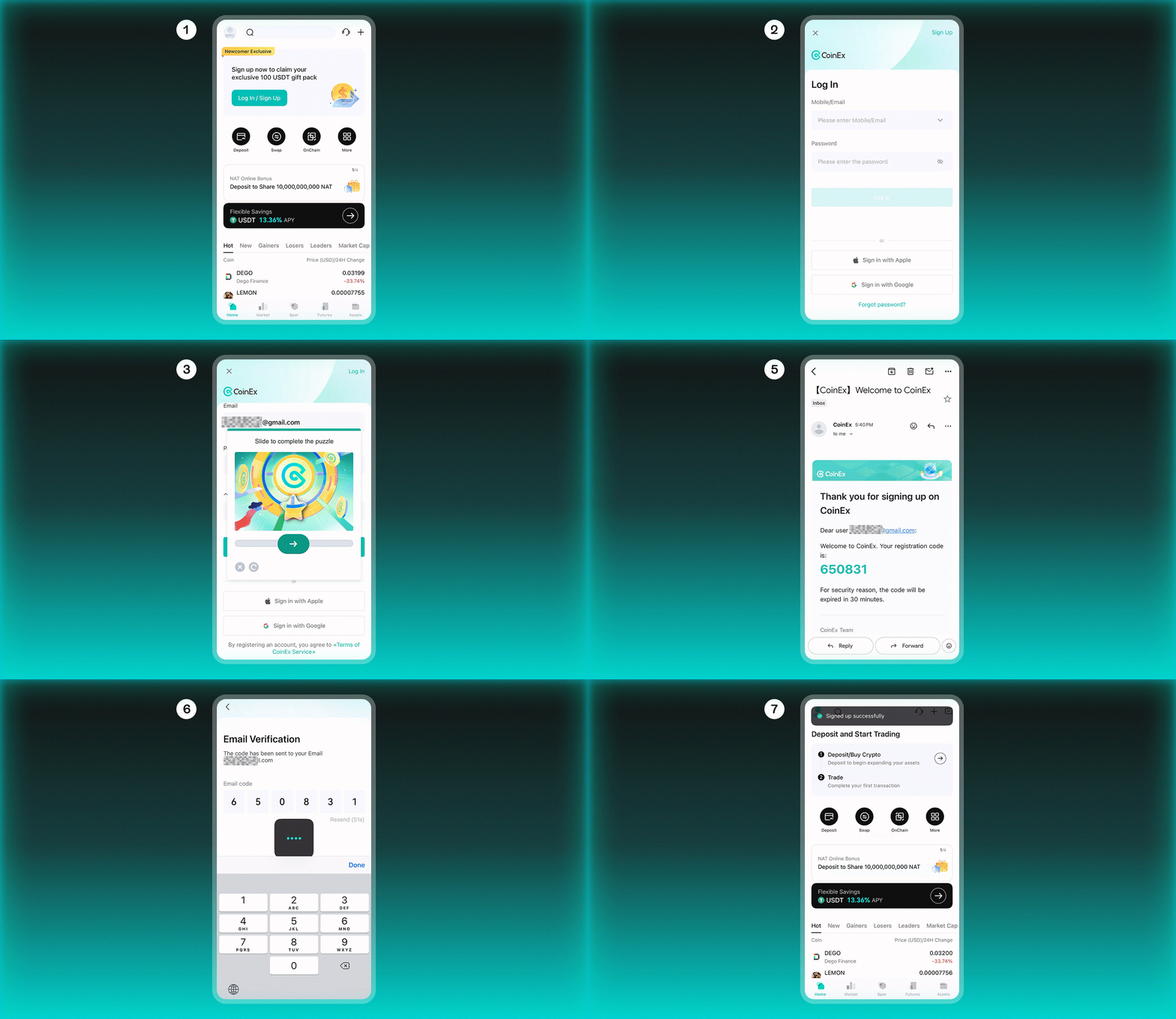
Five minutes is enough.
- Open the CoinEx app. Find Log In / Sign Up and hit it.
- Go with Sign Up. Register with your email or connect your Apple or Google account.
- Before moving forward, the platform runs a quick security check. Slide the puzzle piece to the right. Done in two seconds.
- Your inbox has a 6-digit code from CoinEx. Enter it back in the platform, and you're verified instantly.
- A confirmation message appears along with a notice about updated terms of service. Select Got it to continue.
- Your CoinEx account is ready. A welcome email will be waiting in your inbox.
How to Get Your First Stablecoin
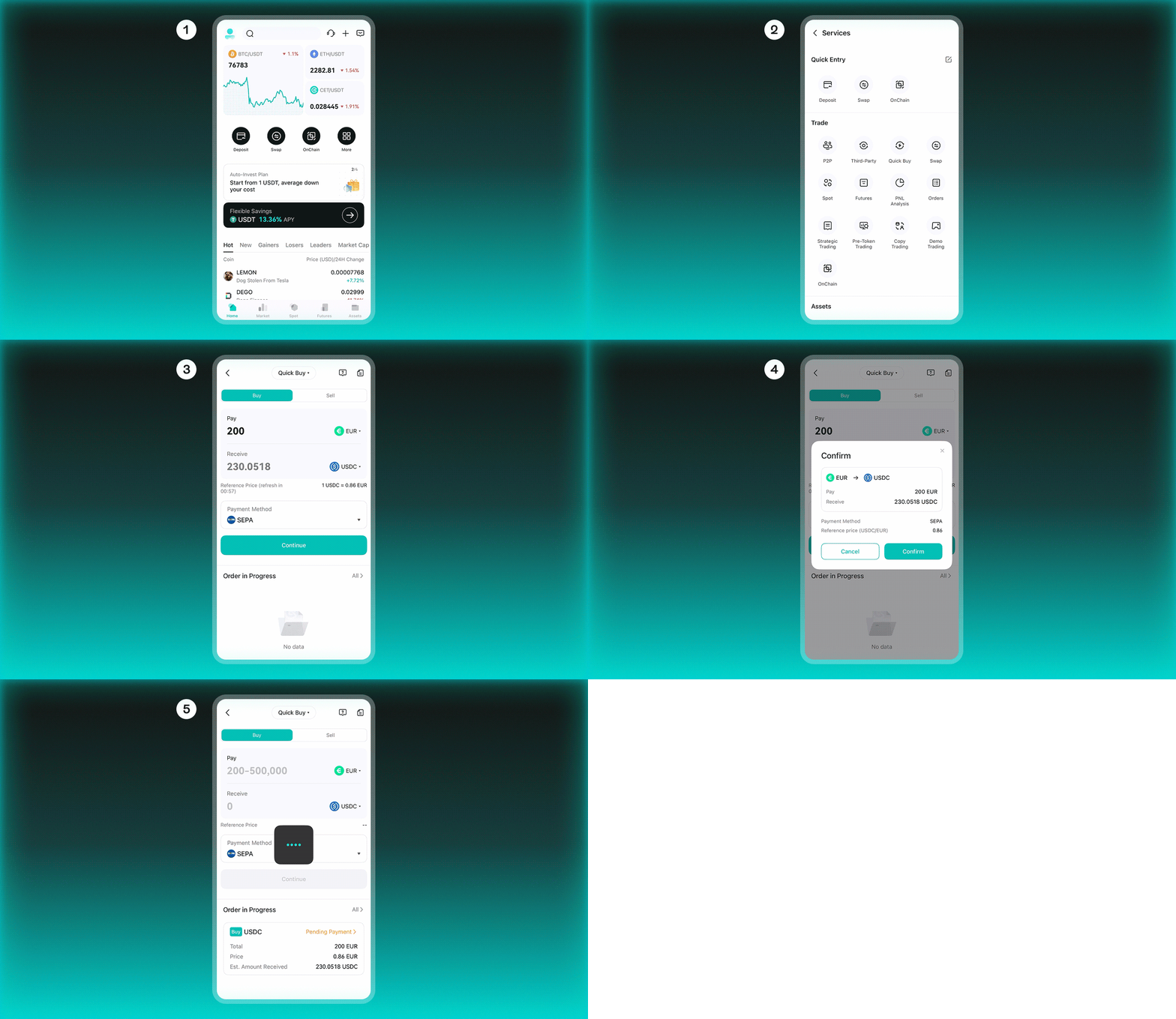
With your account set up, your first stablecoin is a few steps away.
- On the home screen, tap More in the main menu to see all available options.
- The services menu opens. Under the Trade section, hit Quick Buy.
- The purchase screen has two fields: what you're sending and what you'll get back. USDC is already selected as the destination. Choose your payment method and enter an amount to get started.
- Type in the amount you want to convert. The platform shows how much USDC you'll receive and at what rate. Press Continue.
- Look over the numbers. Hit Confirm when you're good.
- The purchase registers with a Pending Payment status. The screen shows the total, the rate applied, and the estimated amount arriving in your account.
Ready to Start?
Getting your first stablecoin used to mean bouncing between platforms and second-guessing every step. This partnership cuts that out. Create your CoinEx account, follow the steps in this guide, and let the Mercuryo widget handle the conversion. The whole thing happens inside one app.
